
Know where every rupee goes.
Sarvimo Khata tracks your spending and salary in rupees, splits bills with family and friends, and settles up with UPI. Your whole month, finally clear.
- Salary stays private
- Settle with UPI
- 7 Indian languages
Made for individuals and households, not for businesses.
Example numbers
Hi, I'm Munshi! Tap me and I'll show you what Khata can do.
Try it
Feel it before you install it.
Put in a salary, tap a few expenses and watch your month come together, just like in the app.
Tap to add an expense
- 🏠 RentHome₹12,000
- 🛒 GroceriesFood₹3,200
- ⛽ PetrolTransport₹1,500
37% of your salary spent
- Home₹12,000
- Food₹3,200
- Transport₹1,500
A quick demo on this page. Nothing is saved.
Features
Everything your money needs.
Built for how India spends: UPI, cash, shared flats, EMIs and a salary that arrives on the 25th.
Add in seconds
Type it. Say it. Paste it.
Type what it was for and Khata picks the category and how you paid. It learns your corrections.
What was it for?
taxi 450 upi
Your usual, in one tap
Repeat your last expense, tap a favourite, or add from the home-screen icon.
Shared groups
Split bills, keep the peace.
A group for the flat, a trip or family. Split equally, by amount or by percentage.
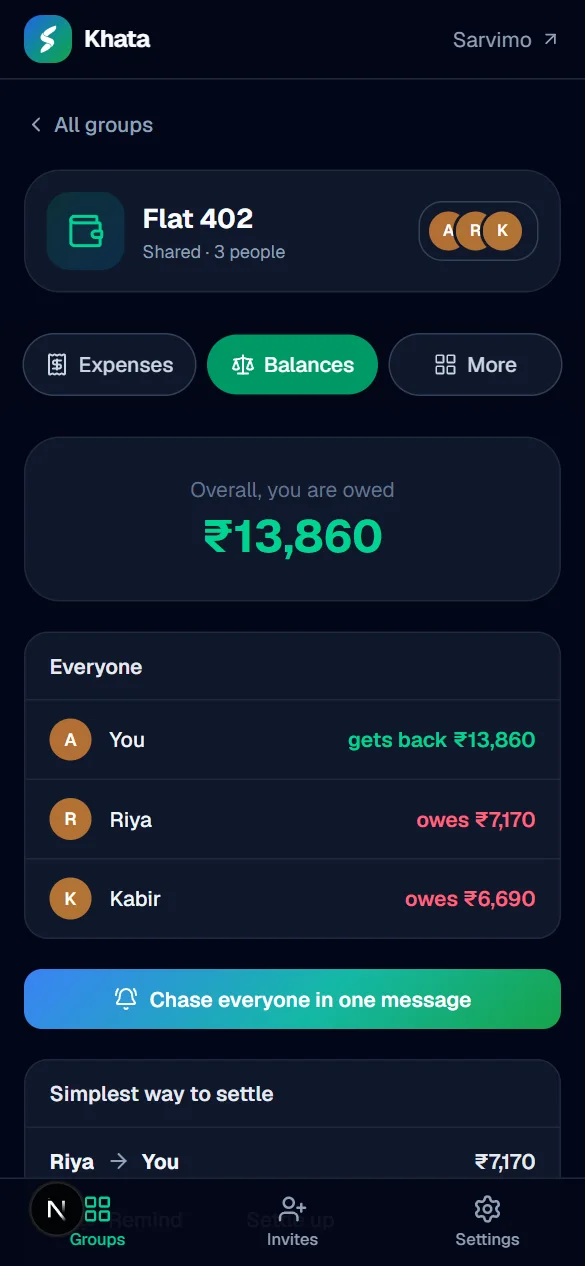
- YYouget back ₹13,860
- RRiyaowes ₹7,170
- KKabirowes ₹6,690
Settle up
Pay back in one tap.
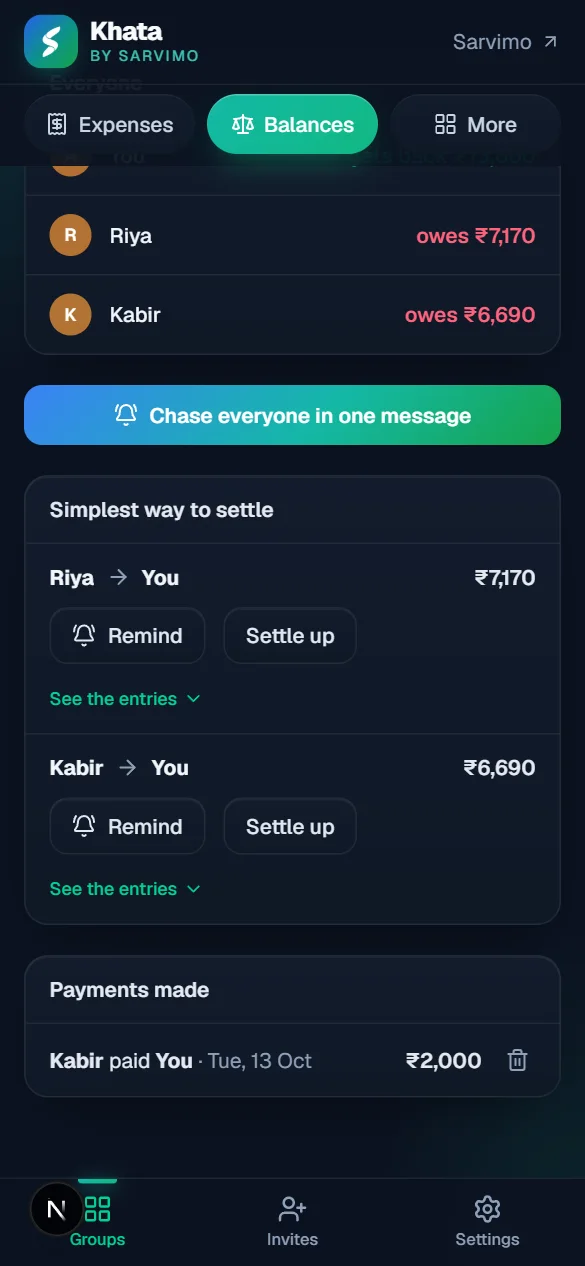
Save your UPI ID and friends can pay you straight away. A gentle reminder is one tap away too.
Budgets
Warned before you overspend.
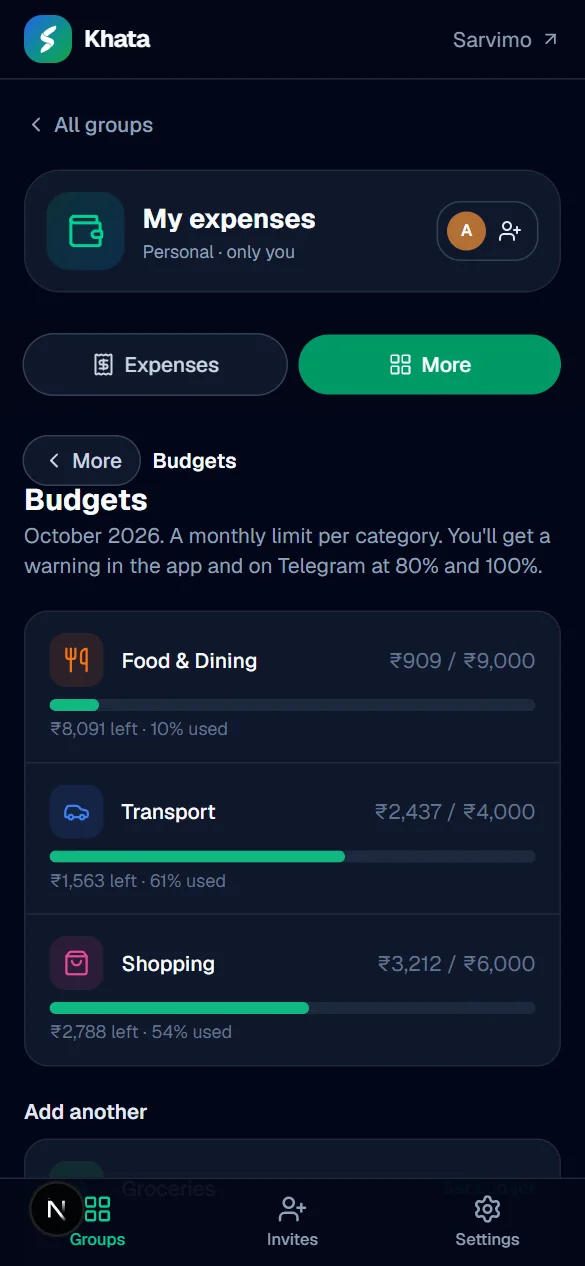
- Food & Dining82%
- Transport61%
- Shopping54%
Alerts at 80% and 100%, in the app and on Telegram.
Month in review
Every month, wrapped.
October
Wrapped.
You spent
₹47,066
Then carry what is left forward, or start fresh.
Reports
PDF, Excel or CSV.
Any day, month, year or dates you choose.
On Telegram too
Alerts and quick adds in chat.
Link SarvimoBot to get budget alerts and weekly highlights, and add an expense with a message.
/spend 250 taxi to airport
🚕 ₹250 added for taxi to airport
Transport · UPI
⚠️ 80% of budget used
🍽️ Food & Dining: ₹7,399 of ₹9,000 in October.
Month end
Carry forward, or start fresh.
When a month ends, choose what happens to what is left, and see every month summed up in your log.
Your language
Khata speaks seven Indian languages.
Your own notes stay exactly as you write them.
- English
- हिन्दी
- मराठी
- ગુજરાતી
- বাংলা
- தமிழ்
- తెలుగు
- Recurring billsRent, EMIs and subscriptions appear on their day.
- Savings goalsSet a target and a date, and watch it fill up.
- Lent and borrowedMoney between you and friends, with part payments.
- Find anythingSearch by words, category, payment, dates or amount.
- Undo in one tapDeleted by mistake? Bring it straight back.
- Repeat and favouritesAdd your last or usual expense in one tap.
- Year in reviewYour whole year: totals, months and standout moments.
- Weekly summariesHighlights by email, and on Telegram if you link the bot.
- Weak signal? FineExpenses wait on your phone and save when you are back.
Why switch
Your diary did its best. Khata does the rest.
The notebook way
- Add it all up by hand at month end
- Who owes whom lives in a long chat
- No idea where the money actually went
- One torn page and it is gone
The Khata way
- Totals and what is left, always up to date
- Balances worked out, settle up with UPI
- Charts, budgets and a month in review
- Kept safely in the cloud, on any phone
Take the tour
A whole money app, in your pocket.
Real screens from the app. Keep scrolling.
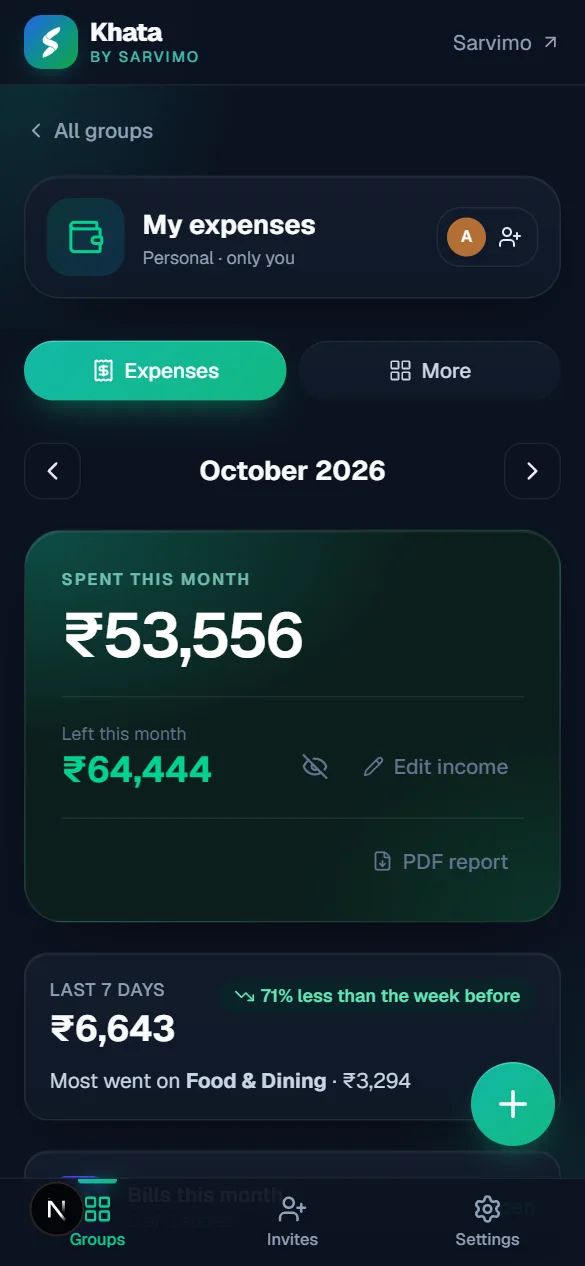
01Home
Your month at a glance
What you spent, what is left of your salary, and how this week compares with the last. Pay day on the 25th? Start your month on any day.
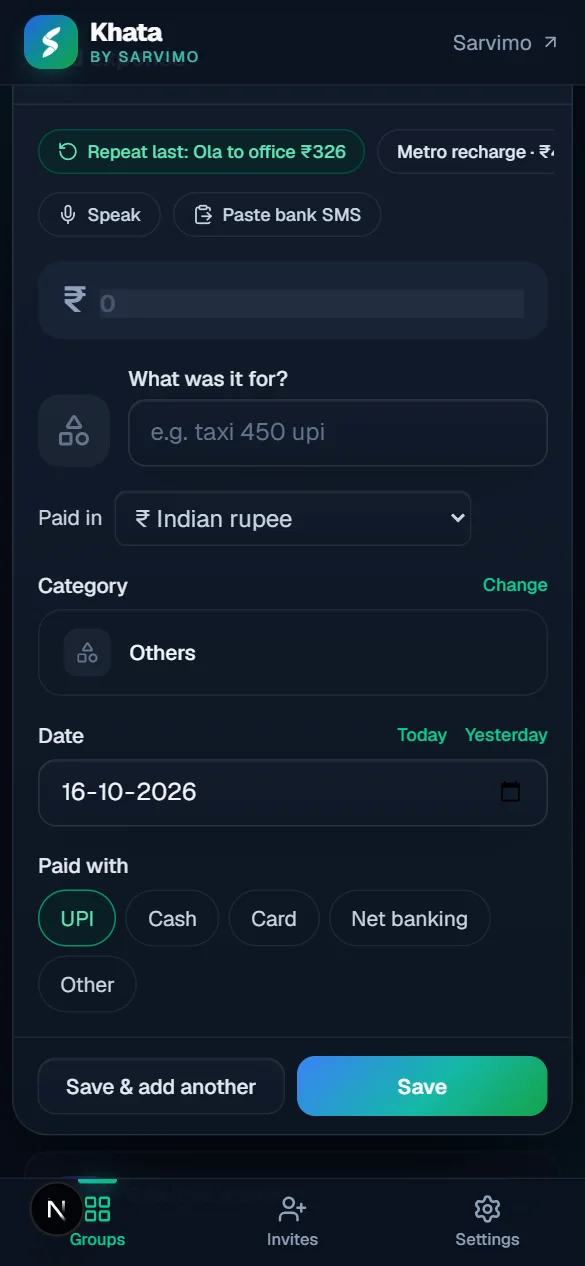
02Add
Add in seconds
Type “taxi 450 upi” and Khata fills in the category and how you paid. Or speak it, or paste a bank SMS.
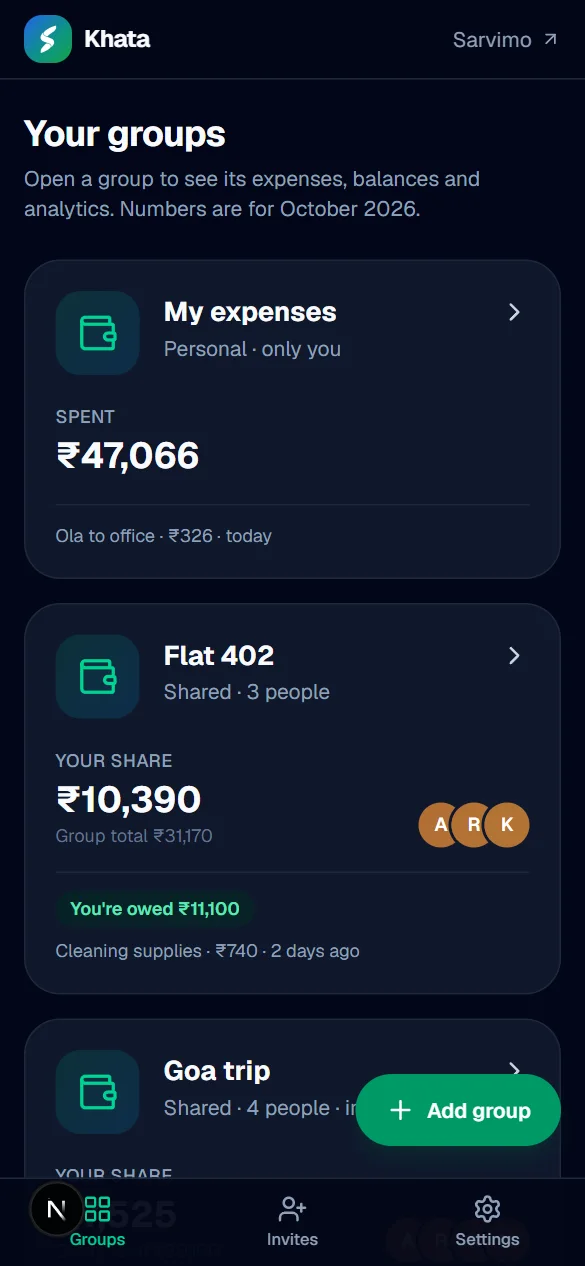
03Groups
Every group in one place
Your own expenses and shared groups for the flat, a trip or family, side by side.
04Balances
Who owes whom, worked out
Everyone's share in a shared group, split equally, by amount or by percentage.
05Settle up
The fewest payments to clear it
Remind people gently, and let them pay your UPI ID in one tap.
06Insights
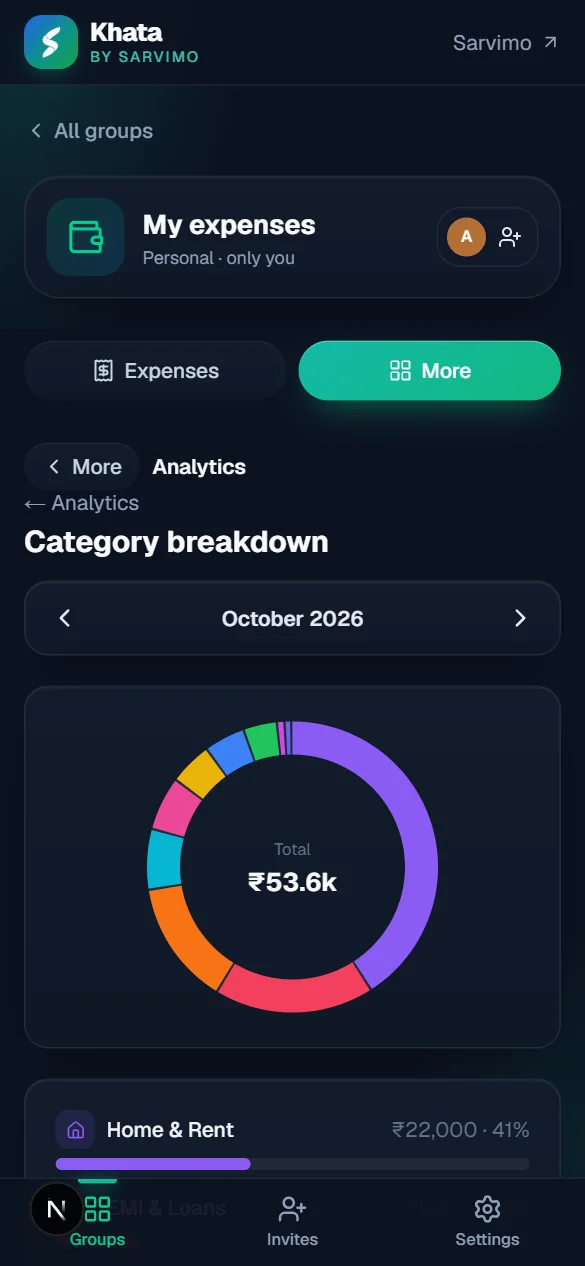
See where it goes
Category breakdown, trends and month vs month, in plain language.
07Budgets
Warned before you overspend
A limit per category, with alerts at 80% and 100% in the app and on Telegram.
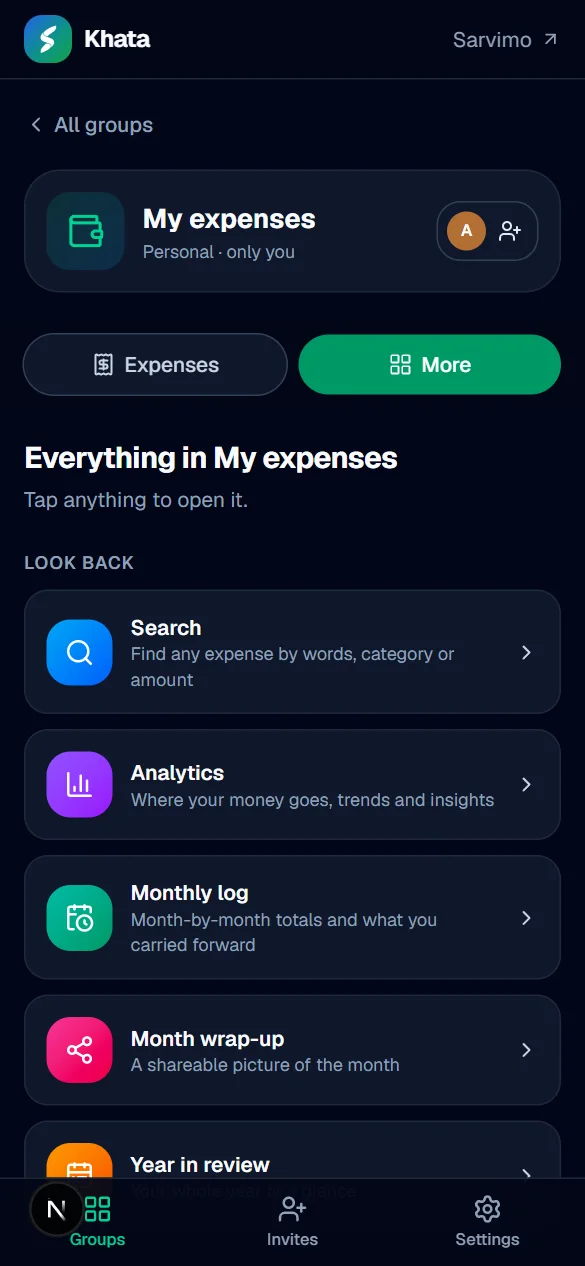
08And more
Everything else, one tap away
Search, monthly log, month wrap-up, year in review and more.
Watch
Meet Sarvimo Khata
A short walkthrough with a voice-over, from adding an expense to shared groups, budgets and reports. Stay till the end to say hello to Munshi.
Privacy
Your money, your business.
Salary stays private
Your income is hidden behind an eye and visible only to you, even in a shared group.
Lock the app
Ask for a PIN or your fingerprint when Khata opens. It stays on your phone.
Take your data
Download a PDF, Excel or CSV for any dates, whenever you like.
On any phone
Your data is kept safely in the cloud, ready on any phone you sign in on.
Khata is for individuals and households. Running a shop or tuition? See Sarvimo Hisaab →
Invite only
Get your invite.
We are opening Khata step by step. Join the waitlist and we open it for your Sarvimo account.
STEP 1
Join the waitlist
Create a free Sarvimo account and tap Join the waitlist. Under a minute.
STEP 2
We open it for you
We approve people step by step. You get an email when it is your turn.
STEP 3
Install and sign in
Add Khata to your phone and sign in. New features simply appear.
Two quick steps
- 1Create a free Sarvimo account. It takes under a minute, and you can use Google.
- 2Tap “Join the waitlist”. You'll come straight back here. That's it.
Already have one? Sign in
Prefer email?
Write to support@sarvimo.com with:
- The email you registered with
- Your Sarvimo ID (on your account page)
Install
On your home screen in a minute.
Install Khata on your phone
It opens like any other app, and always has the latest version.
Android (Chrome)
- Open sarvimo.com/khata in Chrome
- Tap Install app above, or the menu ⋮
- Choose Install app / Add to Home screen
iPhone (Safari)
- Open sarvimo.com/khata in Safari
- Tap Share
- Choose Add to Home Screen
FAQ
Questions, answered.
What is Sarvimo Khata?
Why is it invite-only?
How do I get access?
What happens after I join the waitlist?
How do I install it?
Do I need to reinstall for updates?
Can I use it in my browser?
Is my money data private?
Does it work offline?
Can I get my data out?
Which languages are supported?
Your month, finally clear.
Sarvimo Khata is invite-only for now. Get on the list today.